
Creating AI Fashion Lookbooks: From Concept to Campaign
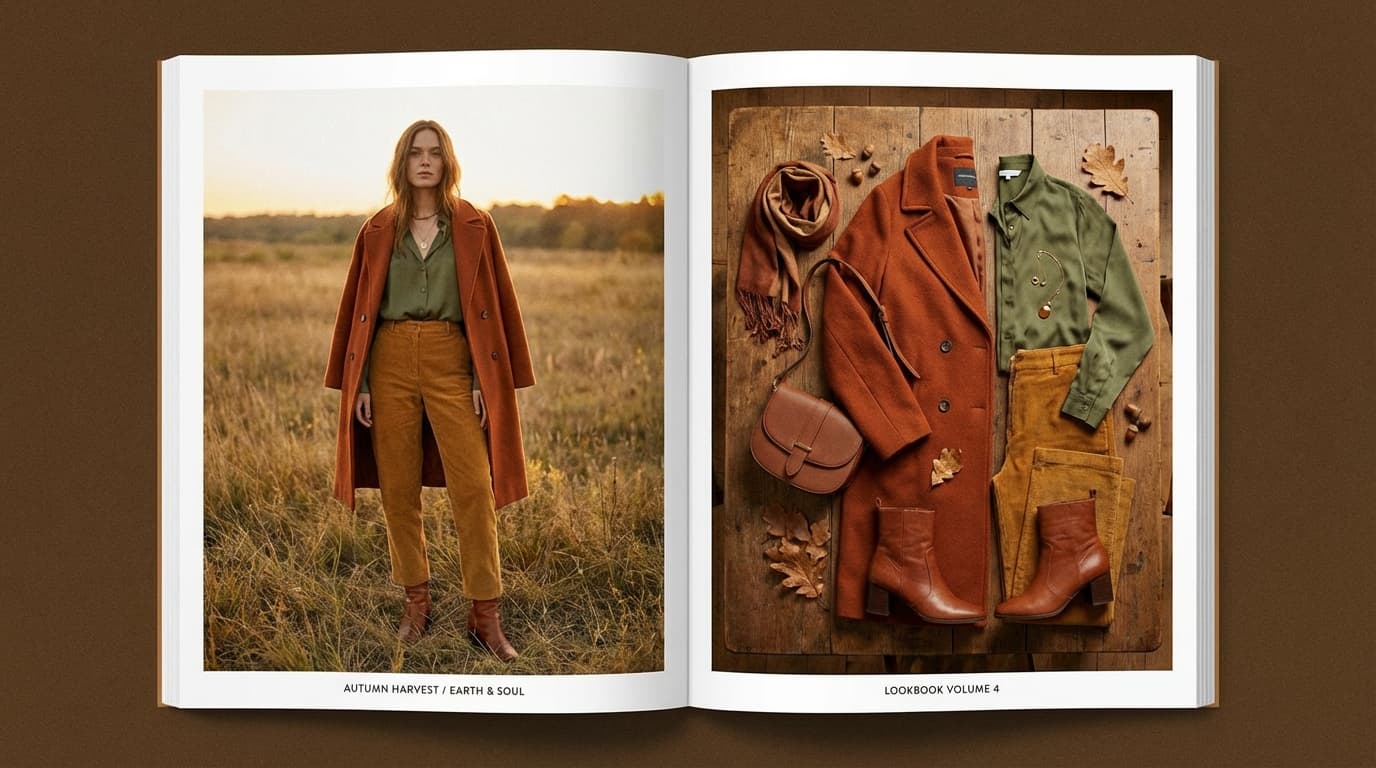
You can create a cohesive AI fashion lookbook by generating every look with the same model reference and style reference, so the images read as one shoot rather than a random set of product photos. This puts full lookbook production — consistent model, styling, and mood — within reach of brands at any scale, at a fraction of a traditional editorial shoot. A lookbook is more than product photos; it's a story — a season, a mood, a lifestyle. Traditional production involves casting models, booking locations, hiring stylists and photographers, and days on set, which for independent brands and small labels often means no lookbook at all.
AI generation makes lookbooks accessible to brands at every scale. The challenge is maintaining the visual coherence that distinguishes a lookbook from a random collection of product shots.
What Makes a Lookbook Work
Consistent model
A lookbook follows one or two models through multiple looks. This creates narrative continuity — the viewer follows a character, not just clothes. With GESTEL's Create tool, upload a character reference image and the AI will maintain that model's appearance across every generation.
Cohesive visual style
Every page should feel like it belongs to the same shoot. This means consistent:
- Color grading and lighting mood
- Background style and location type
- Composition and framing approach
- Post-processing treatment
Upload a style reference that captures your desired aesthetic. The AI will apply that visual DNA to every generated image.
Intentional styling
Each look should feel curated. The garments, accessories, and styling choices tell the customer how to wear the pieces and what lifestyle they represent.
Building Your Lookbook
Step 1: Define the concept
Before generating anything, nail down:
- Season and mood — Spring/Summer warmth and lightness? Fall/Winter layering and texture?
- Location type — Urban street, studio, beach, countryside, interior
- Color story — What palette ties the collection together?
- Target customer — Who is this for? What aspirational lifestyle are you selling?
Write a brief (2-3 sentences) that captures the concept. This becomes your prompt foundation.
Step 2: Select your model
Choose or create your lookbook model:
- Use an existing model photo as a character reference in Create
- Maintain one model throughout the entire lookbook for narrative consistency
- For men's and women's lines, use one model per gender — keep it to two maximum
The character reference ensures facial features, body proportions, and overall appearance stay consistent across all generations.
Step 3: Build the shot list
Plan your pages before generating. A typical lookbook includes:
Hero shots (full page): - 3-5 images, one per key look - Full body, strong pose, maximum styling impact - These anchor the lookbook
Detail shots (half page or grid): - Close-ups of fabric texture, hardware, stitching - Use Create with tight framing prompts or crop from full-body shots - These add editorial depth
Lifestyle shots: - Model in motion — walking, sitting, interacting with environment - These create the narrative between the posed hero shots - Use pose references to guide natural-looking movement
Flat lays: - Outfit components laid out together - Accessories grouped by look - See our flat lay photography guide for composition tips
Step 4: Generate consistently
For each look in your shot list:
- Upload the character reference (same for every shot)
- Upload the outfit as both outfit and product reference
- Upload your style reference (same for every shot)
- Upload a pose reference specific to the shot type
- Generate 3-4 variants, select the best
Critical: Use the same style reference across all generations. This is what creates visual coherence. Changing the style reference mid-lookbook breaks the illusion of a single shoot.
Step 5: Post-process for consistency
Even with consistent references, AI generations will have slight variations. Unify them:
- Relight every image with the same lighting parameters
- Upscale everything to the same final resolution
- Apply the same crop ratio across similar shot types
Engine Choice: Pro vs. Klein
For lookbooks, Pro is usually the better choice:
- Structured prompts give you more control over specific details
- Color accuracy matters for fashion — Pro handles hex color specifications
- Consistency across generations is more predictable with Pro's deterministic approach
Use Klein for supplementary lifestyle shots where you want more creative, unexpected compositions. See our Pro vs. Klein guide for details.
Lookbook Layout Tips
Once you have your images:
- One hero image per spread — Don't compete for attention
- Pair full body with detail shots — Show the look, then the craftsmanship
- Maintain consistent margins and spacing — This creates the polished, editorial feel
- Include product codes or names — Make it easy for buyers to order
Seasonal Refresh Without Reshooting
One of AI's strongest advantages for lookbooks: you can refresh the same collection for a new season without a new shoot.
- Change the style reference to shift from summer warmth to autumn tones
- Swap scene contexts from outdoor to indoor settings
- Update poses to reflect seasonal activities
The same garments, the same model, completely fresh imagery. For more on seasonal content strategies, see our guide on seasonal product photography with AI.
For Independent Brands
Traditional lookbook production costs $5,000-$50,000 depending on scale. An AI-generated lookbook costs:
- Source garment photography: 1-2 hours with a smartphone
- AI generation and post-processing: 1-2 days of work
- Platform costs: a few dollars in generation credits
This puts professional lookbooks within reach of brands at every stage — from pre-launch to established. The quality gap between AI-generated and traditionally photographed lookbooks is narrowing fast, and for digital-first distribution (website, social media, email), AI-generated imagery is already indistinguishable for most viewers.